CMS Content Sync: a free Magento 2 module to export and import CMS pages and blocks
A free Magento 2 module that exports CMS pages and blocks to JSON and imports them into another environment, with a preview and no database copies.
- Version
- 1.0.0
- License
- MIT
- Compatibility
- Magento 2.4.x / Adobe Commerce
- Released
- Oct 5, 2026
- Stack
- Magento 2PHP 8ComposerPage Builder
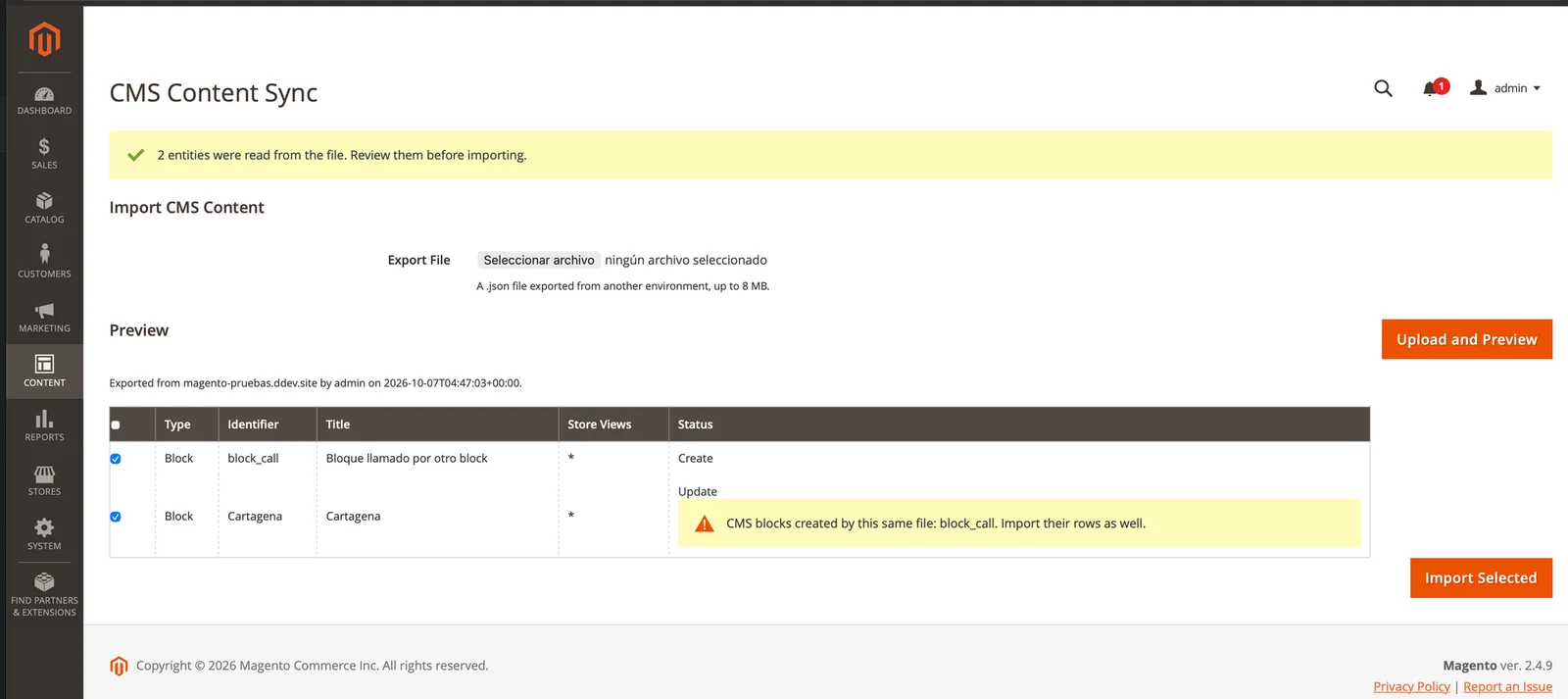
Rosvit_CmsContentSync is a free Magento 2 module that exports CMS pages and blocks to a JSON file and imports them into another environment. Before writing anything, it shows a preview of what will be created or updated. I built it because in almost every Magento project content is built on staging and then has to reach production, and Magento has no way to do that.
Can Magento 2 export CMS pages and blocks?
Not natively. System → Data Transfer exports products, prices and customers, but not CMS content. To move pages and blocks between environments, these are the usual options:
| Option | What it solves | Where it breaks |
|---|---|---|
| Copy and paste in the admin | No development needed | Slow, and easy to get a field or a store view wrong |
| Copy the database or single tables | Moves everything at once | Overwrites content production already has and drags along IDs that don't match |
| Data patches with the content in code | Repeatable and versioned | Every text change needs a developer and a deployment |
| CMS import/export extensions | Handle it from the admin | Most are paid and work with CSV or XML |
What I wanted was simpler: select content in one environment, download a file, upload it in the other one and see what is going to happen before confirming.
What does Rosvit_CmsContentSync do?
It adds an Export to JSON action to the CMS pages and blocks grids, and a CMS Content Sync screen to import. Everything goes through a readable JSON file that you can review, diff or commit to git.
- Mass export of CMS pages and blocks into a single file.
- Preview before import: each row says whether it will be created, updated, left unchanged or fail.
- Store views by code: the file stores
defaultoren, not the store ID, because IDs change between environments. - Blocks inside pages: references to CMS blocks, Page Builder ones included, travel by identifier and are translated into the target's IDs.
- Separate permissions for export and import, configurable per role.
It works with Magento Open Source and Adobe Commerce 2.4.x on PHP 8.2 to 8.5. It's free and open source under the MIT license.
How do you install the module?
Install it with Composer from Packagist, in both environments: the one you export from and the one you import into.
composer require rosvit/module-cms-content-sync
bin/magento module:enable Rosvit_CmsContentSync
bin/magento setup:upgrade
bin/magento cache:flush
Access is controlled by two ACL resources, Export CMS Content and Import CMS Content, under System → Permissions → User Roles.
How do you export CMS pages and blocks to JSON?
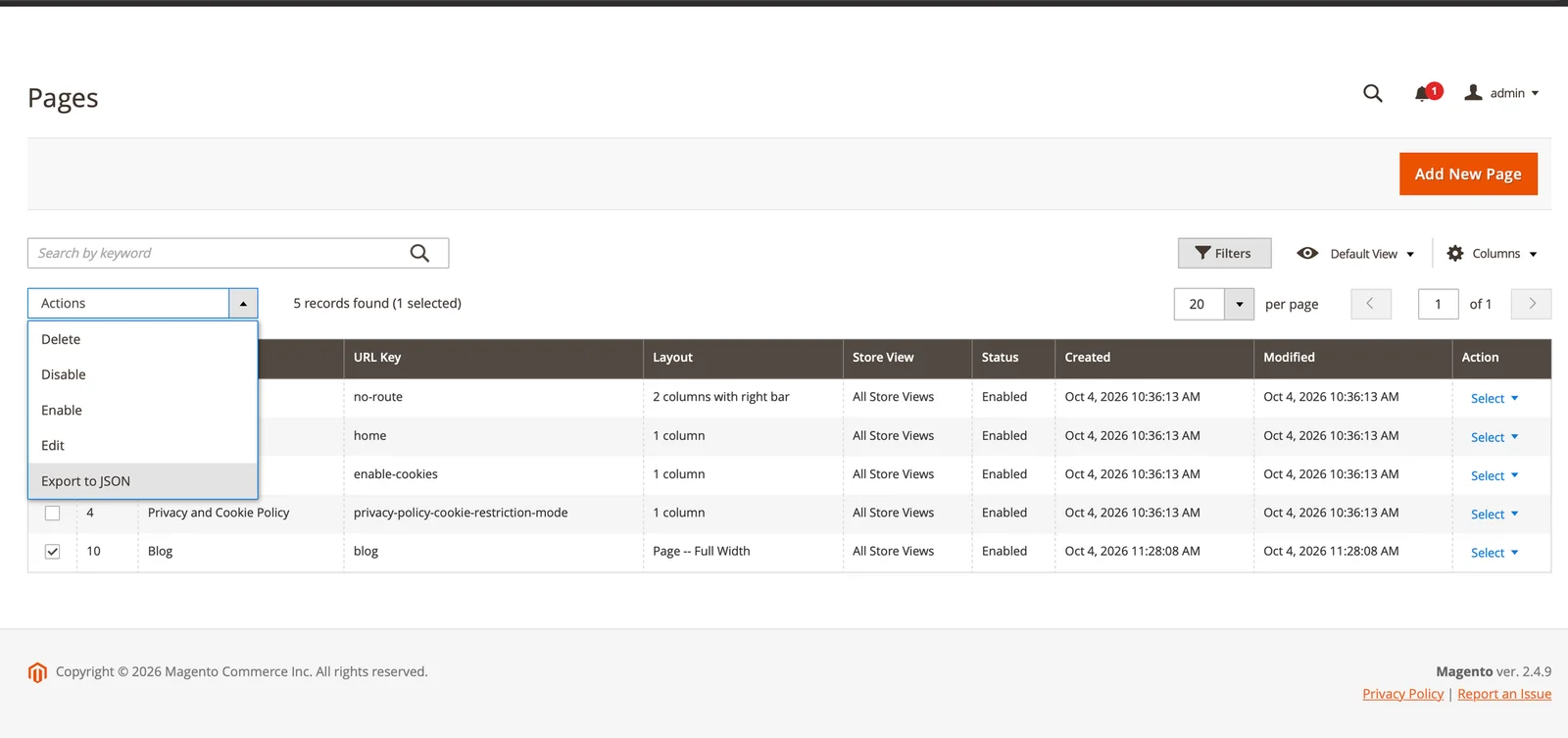
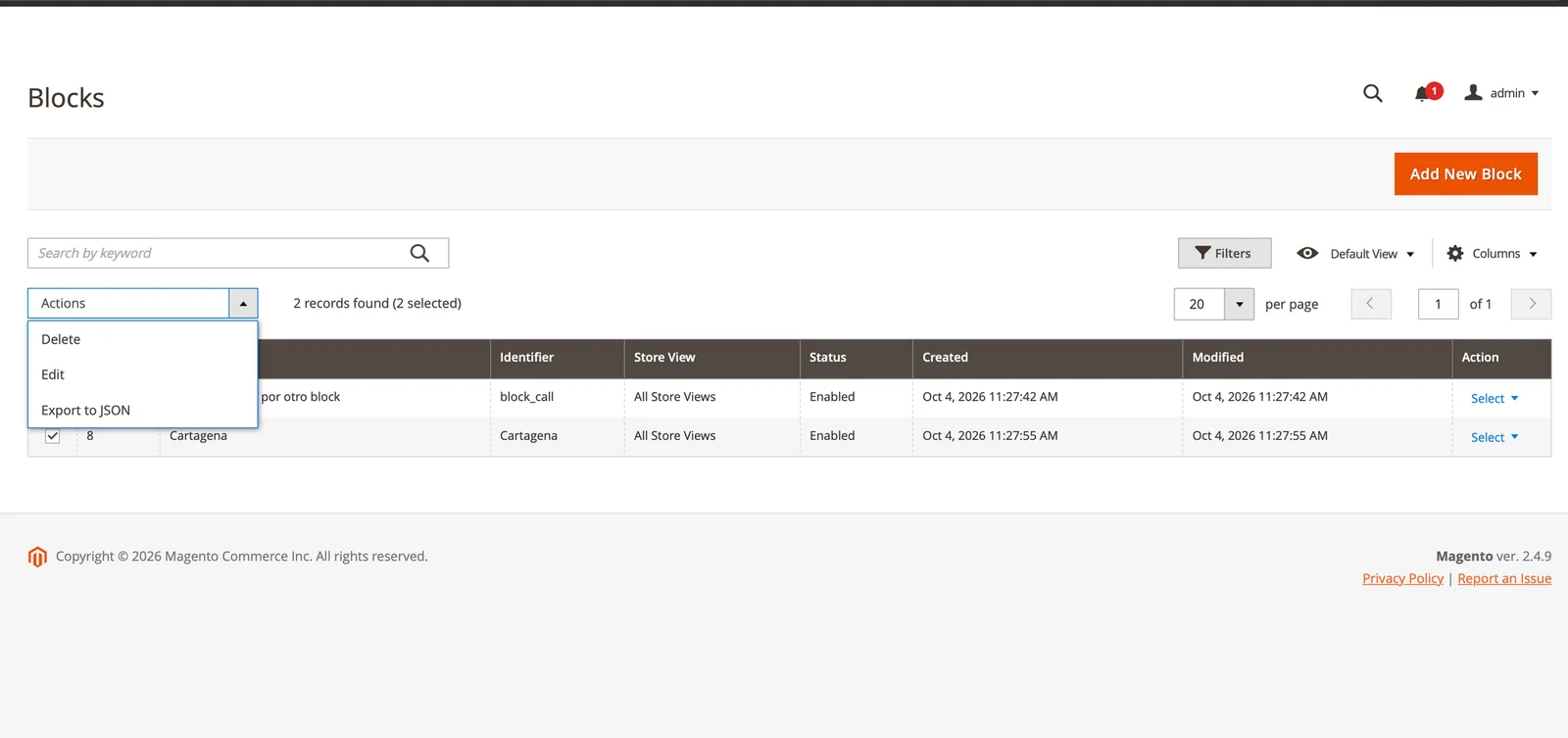
- In the source environment, go to Content → Pages or Content → Blocks.
- Select the rows you want to move.
- Choose Actions → Export to JSON. A file like
cms-content-export-20261005-153000.jsonis downloaded.
How do you import CMS pages and blocks into another environment?
- In the target environment, go to Content → CMS Content Sync.
- Choose the
.jsonfile (up to 8 MB) and click Upload and Preview. - Review the preview and keep ticked the rows you want to import.
- Click Import Selected. When it finishes you see how many rows were created, updated, skipped or failed.
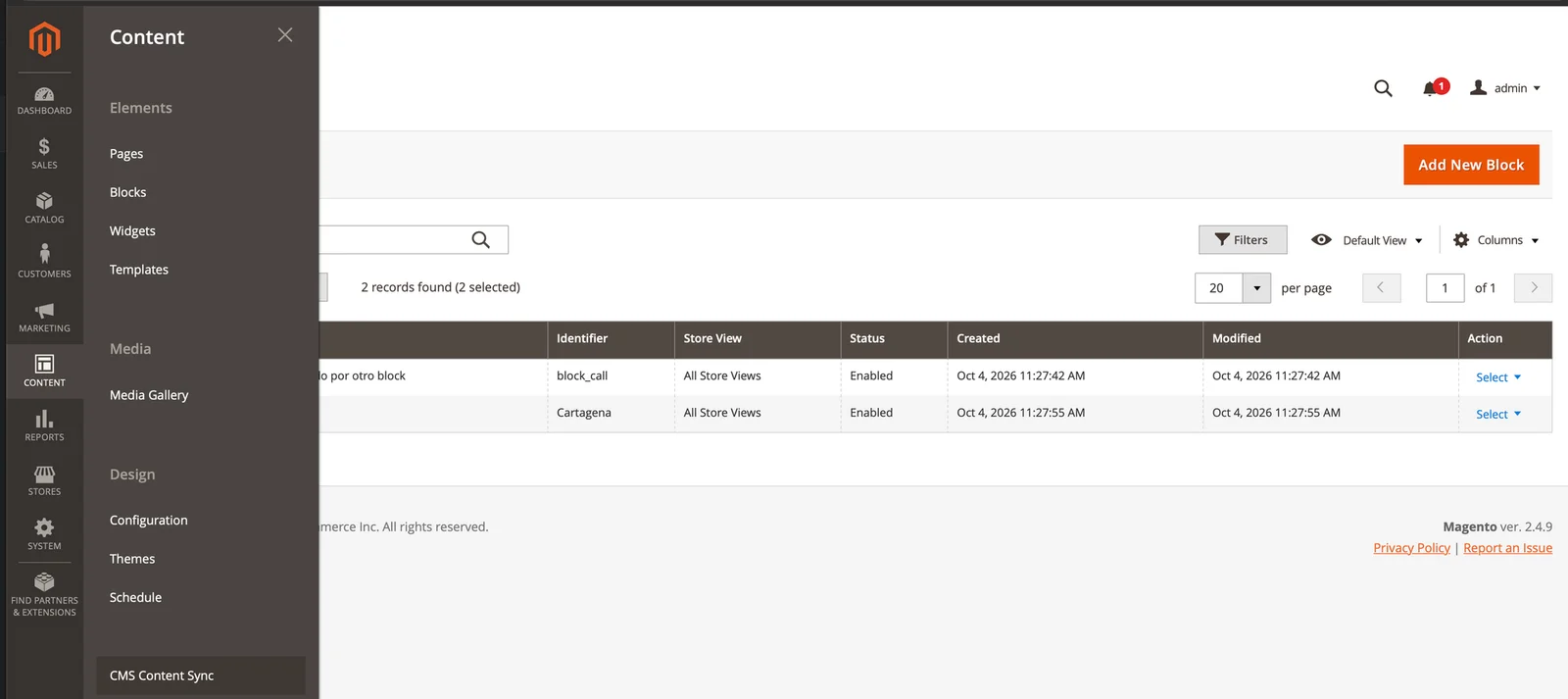
The preview's Status column says what will happen to each row:
| Status | What it means | Ticked by default |
|---|---|---|
| Create | Doesn't exist in the target and will be created | Yes |
| Update | Exists and the file brings changes | Yes |
| No changes | Exists and matches the file exactly | No |
| Error | Can't be imported, for example because of a missing store view | Can't be ticked |
If a row fails during the import, the rest are still imported. Importing 40 pages shouldn't fail entirely because one of them uses a store view the target doesn't have.
What's inside the JSON file?
An envelope with source details and the list of entities. This is a simplified example with one block:
{
    "format_version": 1,
    "exported_at": "2026-10-07T04:47:03+00:00",
    "exported_from": "magento-pruebas.ddev.site",
    "exported_by": "admin",
    "entities": [
        {
            "entity_type": "cms_block",
            "identifier": "Cartagena",
            "title": "Cartagena",
            "content": "{{widget type=\"Magento\\Cms\\Block\\Widget\\Block\" template=\"widget/static_block/default.phtml\" block_id=\"block_call\"}}",
            "is_active": true,
            "store_codes": ["*"]
        }
    ]
}
There are no IDs. block_id points to the block identifier, store_codes uses store codes and * means All Store Views. Pages also carry page_layout, the meta fields, content_heading, sort_order and the design fields.
Technical decisions
Why a JSON file?
Because I wanted the file to be readable. It's pretty printed on purpose, so you can open it, diff it and keep it in the repository with the rest of the project.
Only format_version affects the import: if the format ever changes, the module rejects the file up front instead of failing halfway through. exported_at, exported_from and exported_by are shown in the preview so whoever imports knows where the file came from.
Why don't IDs travel between environments?
Because they don't match. The hard part wasn't exporting. It was making the content work in an environment where the IDs are different. The file stores codes and identifiers, and the target translates them into its own IDs.
Store view 1 on staging can be store view 3 in production, so the file stores the store code. The All Store Views scope travels as *, because its real code is admin, and inside a content file that looks like a mistake.
How do you export a CMS block used inside a page?
By rewriting the reference: from ID to identifier on export, and from identifier to the local ID on import. This was the case that cost me the most. A page that uses a block stores something like this in its content:
{{widget type="Magento\Cms\Block\Widget\Block"
         template="widget/static_block/default.phtml"
         block_id="1"}}
If the page is exported as is, it still points to block 1 in the target. But that block may end up with ID 3 after import, and the page shows a different block or nothing at all. So:
- On export, every
block_id="1"is replaced with the block identifier, for exampleblock_id="footer_links". - On import, the module looks up
footer_linksin the target, within the page's store views, and replaces it with its local ID. - If the block doesn't exist, the identifier is kept and reported, in the preview and after the import.
That last point has a useful side effect: Magento can also load a block by its identifier. A page imported before its block starts working on its own as soon as the block is created, without importing it again.
The module translates the three ways to reference a CMS block: the Magento\Cms\Block\Widget\Block widget (the one Page Builder uses), {{block class="Magento\Cms\Block\Block" block_id="..."}} and {{block id="..."}}. It also applies to blocks that use other blocks.
In what order are pages and blocks imported?
Blocks first, pages second. When one file carries a page and the block it uses, the page then finds the block that was just created. The preview also warns when content depends on a block from the same file, so you don't forget to tick it.
How does it decide between create and update?
It looks for an entity with the same identifier whose store view scope overlaps the one in the file. The identifier alone isn't enough, because it can repeat across store views.
The preview and the import use exactly the same lookup. Otherwise the preview could promise Create while the import overwrites something else.
When is the database written?
Only on Import Selected. On upload, the module validates the file (extension, size, format_version, type and identifier of every entity) and stores it under var/. Only a token pointing to that file travels in the admin session, so a heavy export never inflates it.
Validation
I tested it on a local Magento 2.4.9 environment running on DDEV, with a case that has dependencies between contents: a blog page that uses the Cartagena block, which in turn uses the block_call block.
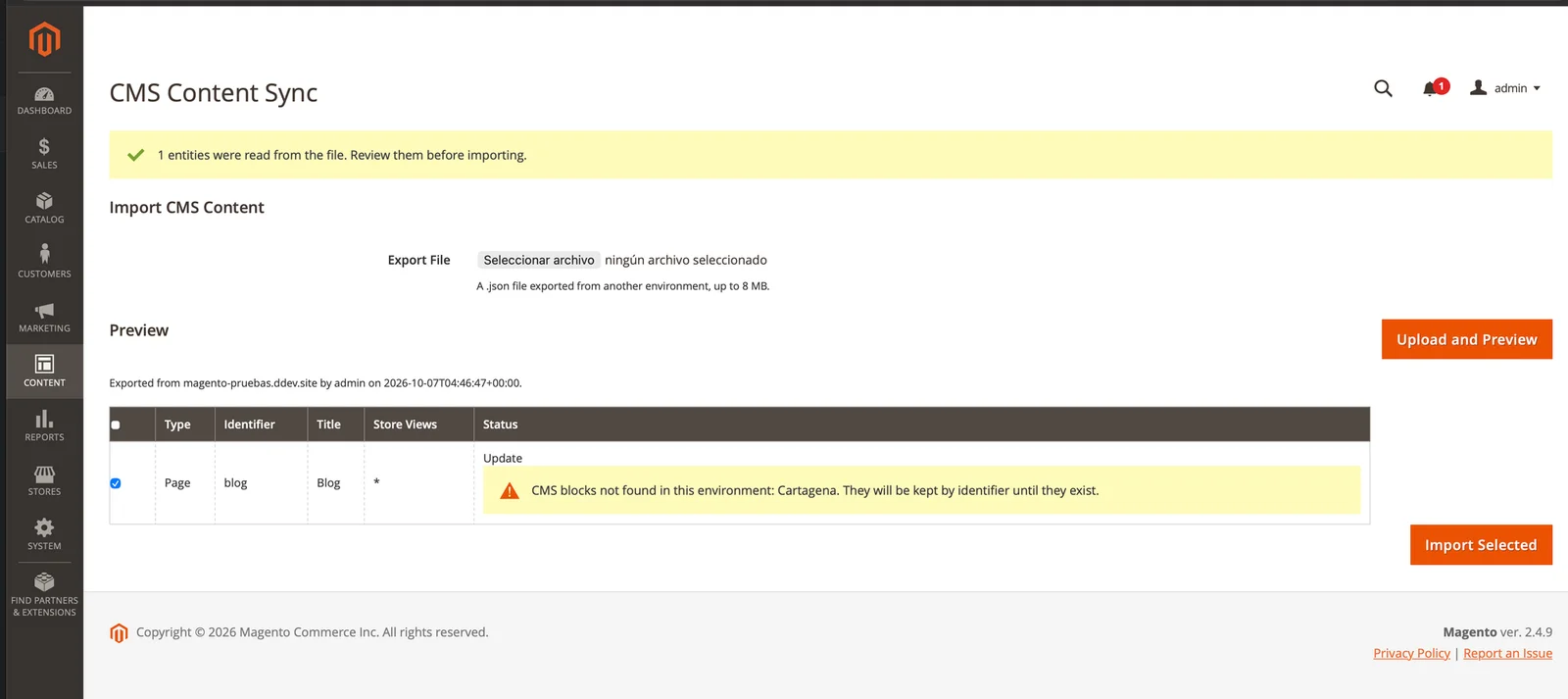
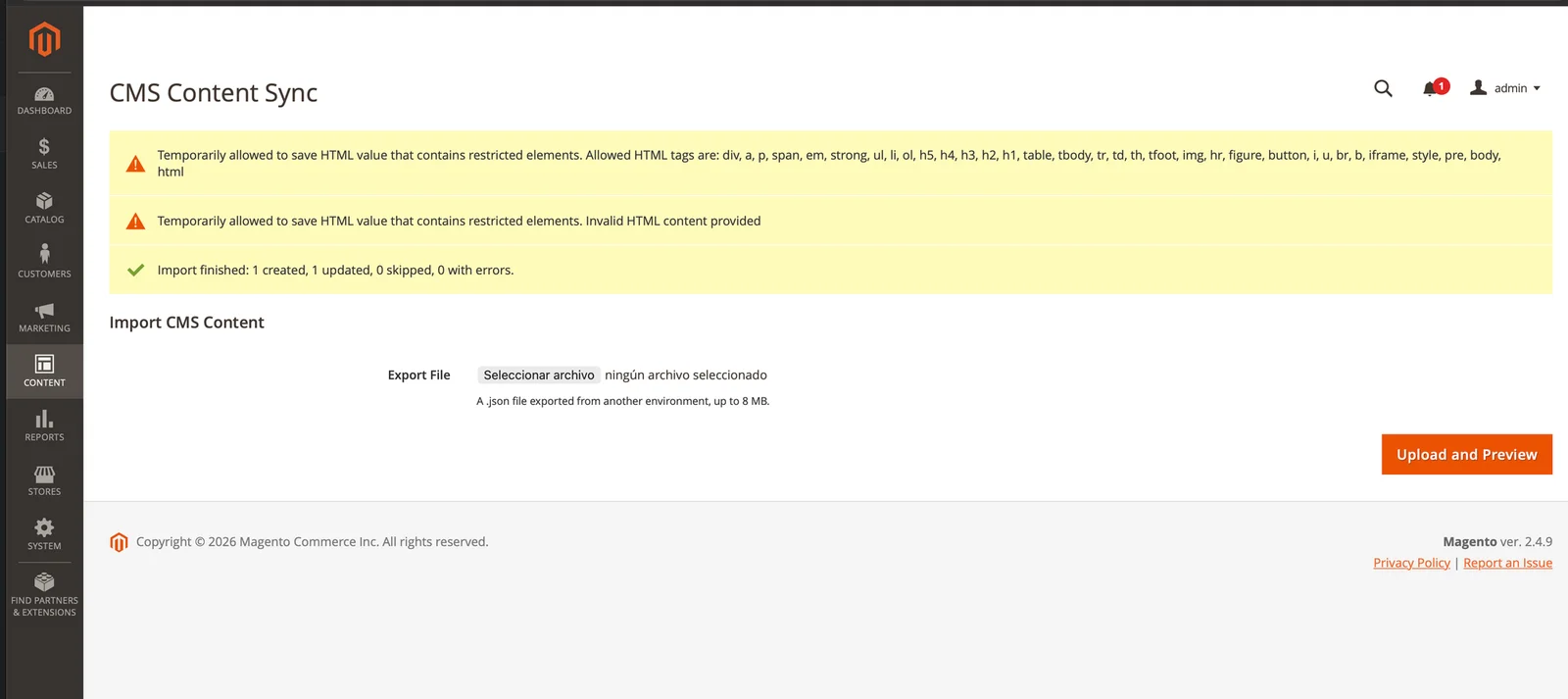
That last screenshot also shows notices from Magento itself: it validates the content HTML on save and shows "Temporarily allowed to save HTML value that contains restricted elements". They don't block the import, but they don't say which page or block they refer to.
Known limitations
The module handles CMS content, not everything that content touches:
- Images don't travel. The content keeps the
pub/mediapaths, but the files have to be copied separately. - Only block IDs are translated. A product or category widget still points to the source IDs.
- Layout XML isn't rewritten.
layout_update_xmlandcustom_layout_update_xmltravel exactly as they are in the source. - Store views must exist with the same code in the target. If one is missing, that row shows an error in the preview.
- Import replaces every exported field, empty ones included. The file is the source of truth: if a meta description was cleared in the source, it is cleared in the target too.
- An identifier made only of digits (for example
123) is exported as an ID, because on import it couldn't be told apart from one.
Lessons learned
- The exchange format is the architecture decision. Exporting is a
json_encode. What makes the file work in another environment is deciding from the start that no ID goes into it. - A preview is only useful if it matches the import. That's why both share the same entity lookup, and the comparison runs the current content through the same exporter that produced the file.
nulland empty are not the same. If the file is the source of truth, it has to be able to say "clear this meta description". That's why nulls are kept end to end instead of becoming empty strings.- A batch shouldn't fail because of one row. Each row is imported on its own, and the final summary says how many were created, updated, skipped or failed.
Code, license and feedback
Rosvit_CmsContentSync is free and open source under the MIT license. The code is on GitHub and the package on Packagist as rosvit/module-cms-content-sync.
If you use it and find a case it doesn't cover, open an issue. I'm especially interested in which other kinds of references you'd like to travel between environments.
Frequently asked questions
Can Magento 2 export CMS pages and blocks natively?
No. Magento 2's System → Data Transfer exports products, prices and customers, but not CMS pages or blocks. Moving them between environments takes a module like Rosvit_CmsContentSync, data patches or a database copy.
Does it work with Page Builder?
Yes. Page Builder inserts CMS blocks with the Magento\Cms\Block\Widget\Block widget, which is one of the three reference forms the module translates from ID to identifier on export and back to an ID on import.
Does it copy images from pub/media?
No. The content keeps the image paths, but the pub/media files have to be copied to the target environment separately.
What happens if a page uses a block that doesn't exist in the target?
The page is imported anyway and the reference keeps the block identifier. The preview and the final summary report which blocks are missing. Since Magento can also load blocks by identifier, the page starts showing the block as soon as it's created.
Does it work with Adobe Commerce?
Yes. It works with Magento Open Source and Adobe Commerce 2.4.x on PHP 8.2 to 8.5.
Is it free?
Yes. It's open source under the MIT license and installs from Packagist with composer require rosvit/module-cms-content-sync.